Your video flopped.
We'll tell you why.
Edison finds the small channels quietly winning in your niche, compares them against your content, and hands you a timestamped action plan before the next upload. One report can cover weeks of decisions.
Arnonaut: 8 → 141K views · one report
Steal what works.
We scan your niche for videos that outperformed their channel size and break down exactly why they went viral. Build your next idea on proven data, not guesswork.
One video, outperforming everything else in the niche.
Fix your drop-offs.
We map your retention against the market average and tell you exactly where your pacing failed and how to cut the dead weight to keep viewers watching longer.
Your next video, planned.
Get a step-by-step checklist of script changes, thumbnail ideas, and editing fixes based on proven data, not generic advice.
Creator Case Study
From guessing in the dark
to knowing what to fix.

Arnonaut
Verified creator
Arnonaut — the creator whose video went from 8 to 140,000 views after using Edison — later made a video on his own channel talking about what changed. At 4:49, he credits Edison by name. This is that video.
This isn't the video that blew up — watch the original that went 8 → 140K viewsFor me the biggest help was being able to finally see the blind spots I had. Issues that were holding me back without me even realizing. Additionally, it also reinforced a number of thoughts I already had about what I wanted to change. It galvanized my own analysis, as well as showing me entirely new avenues of improvement! In the end after digesting everything from my report It gave me clear direction and motivation! I went from feeling like I was in the dark and hoping something would stick to knowing exactly what I need to do. It still takes hard work and persistence, but the results speak for themself!
Compare your
content to the
best in your niche.
This isn't generic advice.
Our agents actively discover competitors outperforming you, then analyze exactly why their videos worked and yours didn't.
Want to read a complete, unedited report to see what Edison can do?
The Diagnosis
You've created a solid foundation with this "let's play" video. The audio is clear, the game choice is interesting, and your commentary style is calm and observant. However, the video's performance is being held back by a fundamental structural issue: it's a "raw playthrough" competing in a world of "curated experiences."
Your video: 18 views, 100.0% like rate Core problem: The video presents gameplay without actively shaping the viewer's experience, leading to a weak hook, dead air during lulls, and a lack of emotional resonance during key moments, as seen from 0:00-0:20.
Gap Analysis
| Feature | Your Video | Top Competitors | The Impact |
|---|---|---|---|
| Opening Hook | 0:00-0:20 - The video starts with a silent, in-game cinematic. This fails to establish the creator's presence or the video's unique value proposition, making it feel generic and easily skippable. | youtube.com | Your approach loses viewers in the first 10 seconds. The competitor's method grabs attention and sets a clear expectation of action, dramatically increasing the chance a viewer stays past the 30-second mark. |
| Vocal Energy | 7:15-8:30 - During a tense monster chase, your voice remains calm and level. This creates a disconnect between the visual action and the emotional tone, reducing immersion. | youtube.com | A flat vocal delivery during scary moments can bore the audience. Emotional mirroring makes the experience feel more authentic and shared, which is the core appeal of the "companion" format. |
| Handling "Downtime" | 10:00-10:35 - You spend 35 seconds silently cracking a safe. This creates "dead air" where the viewer's attention can wander and they are likely to click away. | youtube.com | Silent downtime is a retention killer. By narrating the "why" behind your actions or using the time for a personal aside, you maintain the connection with the viewer through slower parts of the game. |
| Ending & Call to Action | 45:15-46:10 - The video ends with a verbal-only tease for the next video. It's functional but lacks a strong hook to bring viewers back. | youtube.com | A weak outro leads to lower session time. A strong, visual "Binge Bridge" gives viewers a compelling, tangible reason to click the next video. |
Learnable Techniques from Competitors
1. The Payoff Preview: Starting with the Action
What Competitors Do:
Instead of starting with a slow intro or a game's default cutscene, top creators grab the viewer's attention immediately. youtube.com1 source
youtube.comI DIDN'T EXPECT THIS FIRST MONSTER..! (Little Nightmares III)DanTDM • 415,652 views • 0.0x ratioVisit Website (
https://www.youtube.com/watch?v=vI1qIP0prqY&t=0s) opens with a 4-second clip of a massive monster hand smashing through a wall (0:00-0:04) — a moment that doesn't occur until much later in the game. youtube.com
1 source
youtube.comHow Much For You To Visit This BasementDaz Games • 645,637 views • 0.1x ratioVisit Website (
https://www.youtube.com/watch?v=gzV0qxq-VWw&t=0s) immediately sets the stage with high energy and a clear premise before gameplay even begins.
Why This Works: This technique leverages Information Scent. In the first few seconds, it gives the viewer a powerful "scent" of the excitement to come. By showing the payoff upfront, it creates an open loop: "How did he get into that situation?" The viewer is now primed to watch the build-up because they know a thrilling moment is guaranteed.
Your Current Approach: Your video begins with a 20-second, unedited in-game cinematic with no voiceover (0:00-0:20). This fails to introduce you as the host or provide any unique hook, making it indistinguishable from thousands of other playthroughs.
The Fix:
- Find the most visually interesting or high-tension moment from your entire recording. The monster reveal at 7:15 or the elevator escape at 23:15 are perfect candidates.
- Clip 3-5 seconds from that moment. The ideal clip shows the threat but cuts just before the resolution.
- Place this clip at the very beginning of your video (0:00).
- After the clip, transition into your regular intro or the game's opening cutscene.
Proof This Works:
- youtube.com
1 source
- youtube.com
2. Emotional Mirroring: Matching Your Voice to the Action
What Competitors Do: Successful horror let's-players act as an emotional proxy for the audience. When the game is tense, their voice becomes a whisper. When a monster attacks, they react with a genuine spike in volume. Daz Games' voice is calm while exploring, but when a monster appears at 15:41, his reaction is loud and immediate. Jacksepticeye shifts from inquisitive to excited when finding a ghost at 26:05-26:25, celebrating the discovery with the audience.
Why This Works: This is a core principle of Embodied Cognition. Viewers don't just process information logically — they feel it. When your vocal cues match the on-screen action, it creates a powerful sense of immersion and shared experience. A calm voice during a terrifying moment creates a "dissonance gap" that pulls a viewer out of the experience entirely.
Your Current Approach: During the intense elevator sequence (23:15-24:45), where the character is struggling and a monster is approaching, your voice remains largely unchanged. You are narrating the game from an external perspective, while top competitors are reacting to it from an internal, emotional one.
The Fix:
- Whisper: When entering a creepy area, lower your voice. This forces the audience to lean in. See how DanTDM does this at 41:30.
- Spike: When a sudden event occurs (like the wall breaking at 14:15), let your voice jump in volume. A simple "Whoa!" signals that this is an important moment.
- Pace: When running from an enemy, speed up your speech. When carefully solving a puzzle, slow it down.
Proof This Works:
- youtube.com
- youtube.com
3. Narrating the Friction: Turning "Boring" into Engaging
What Competitors Do: They treat moments of "friction" — menus, crafting, backtracking — as opportunities, not dead weight. Daz Games talks through his confusion when stuck on a puzzle (13:00-13:40), making it a relatable moment. When Brad has to stock shelves, he turns the mundane task into commentary on the game's design (5:25-5:50).
Why This Works: This technique maintains Cognitive Momentum. The viewer's brain is always being fed new information or emotional context, even when the on-screen action is static. By narrating your thought process during a map check (33:15-33:45), you're not just showing them a map — you're involving them in the decision-making process.
Your Current Approach: You have several "dead air" moments during crafting (5:00-6:00), checking the map (20:15-20:30), and long stretches of walking (0:35-1:45). You are treating UI and traversal as necessary evils, while competitors treat them as opportunities for connection.
The Fix:
- Narrate the Why: Instead of just crafting, explain why. "I'm crafting more ammo because that last fight drained me, and I have a feeling we're about to run into something worse."
- Think Out Loud: When looking at the map, trace your route with words. "Okay, we're here at the furnace. I think the safest path is through this side tunnel, even if it's longer."
- Recap and Predict: Use backtracking to summarize the story so far and speculate on what's next.
Proof This Works:
- youtube.com
- youtube.com
What You're Already Doing Right
-
Excellent Audio Quality — Your voice is consistently clear, and the mix between commentary and game audio is perfect throughout. This is a fundamental that many creators get wrong. It makes your videos easy and pleasant to listen to.
-
Respect for Narrative Moments — At 18:30-19:30, when Grace reunites with Emily, you wisely choose to remain silent. This shows a strong understanding of storytelling, allowing the emotional weight of the scene to land without interruption. This is a sign of a mature content creator.
-
Effective Binge-Bridging — Your mention of the upcoming Minecraft series at 28:45 and again at the end is a great strategy. You're already thinking about the viewer's next watch.
Edison Editor
Most tools stop
at the diagnosis.
Edison eliminates the busywork of post-production. Cut faster, focus on the creative.
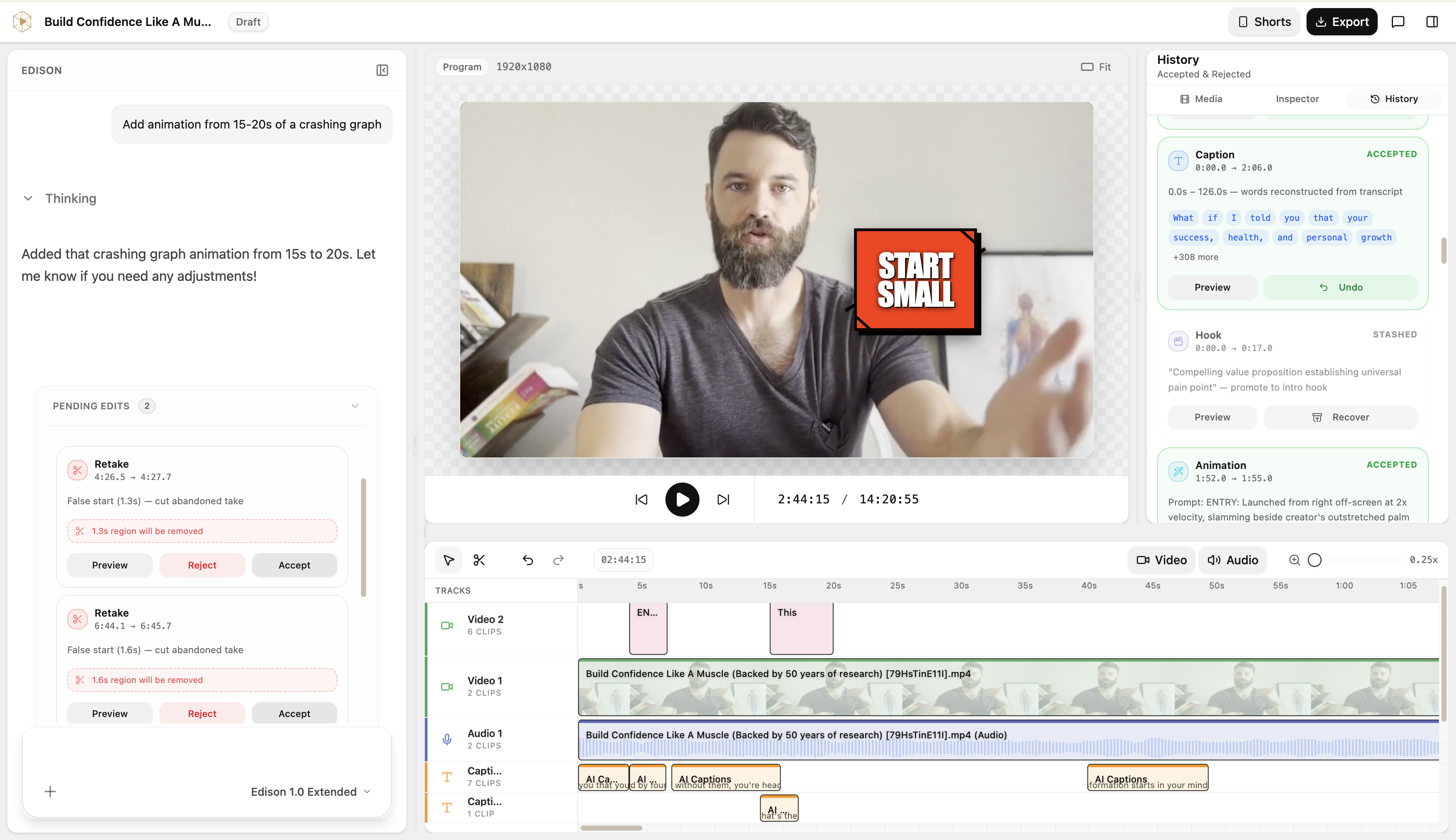
Clean your timeline instantly
Mistake RemovalEdison watches your raw footage and flags every false start, stutter, and awkward silence — ready for 1-click approval.
Hold attention with auto-pacing
Dynamic ZoomsSmart punch-ins on key emphasis points keep visual retention high without you touching a single keyframe.
Generate captions as you edit
SubtitlesWord-level animated captions built automatically. YouTube chapter markers rendered directly from your script.
Extract Shorts without a second app
Multi-FormatPull your strongest hook into a vertically-framed 9:16 Short directly from the same long-form timeline.
Instruct your editor in plain English
Edison Co-PilotAsk the AI to trim a tangent, re-style captions, or suggest a stronger cut.
Apply pro polish automatically
AnimationsJump cuts, subtle zooms, smooth transitions, and lower thirds added based on the context of your video.
The Hard Truth
Nobody knows how the
YouTube algorithm works.
Anyone who says otherwise is selling you something.
We don't either. So we stopped chasing the algorithm and started chasing the channels quietly winning anyway.
Edison finds them. Breaks them down. Hands you the blueprint.
Why Edison is paid
You're buying the research, not access to another dashboard.
Edison is a paid membership from the first report—there is no trial dashboard or free analysis. Every report uses deep AI research across your channel, niche, competitors, and creative decisions, so you see the actual work before deciding whether it is worth paying for.
Find the small channels and outlier videos already winning in your niche
Compare your hook, title, thumbnail, pacing, and retention against them
Get timestamped fixes for the next upload — not vague creator advice
Use chat, script, thumbnail, and research tools after your report is ready
Pricing
Stop guessing why
a video underperforms.
Edison uses the niche, content direction, and reference channels you set up to explain why a video missed — and what to change before the next one.
Need proof?See what an Edison end result looks likeCompare your ideas against the creators you are actually chasing.
Diagnose the packaging, topic, and retention problems behind low views.
Leave each analysis with specific changes for your next upload.
Cancel anytime · secured by Paddle
Pro
PopularFor creators who can't afford to waste a video. Validate your idea, catch problems before upload, and get a full growth report every month.
3-day trial · $17 today· cancel anytime
USD / month
then $97/mo after trial
Everything in Starter and:
- Validate your idea before you film — 6 checks/month
- Fix your video before it goes live — 1 run/month
- 2 Edison reports/month including a progress review
- 3 thumbnail research sessions/month
- 40 thumbnail generations or edits
- 200 chats and script writer
Before you buy
Straight answers. No sales fog.
Is there a free trial?
No. Edison is a paid membership with no free tier. Starter plans begin at $49/month; inspect the full public report and verified creator result before you buy.
Who is Edison for?
Creators posting or preparing YouTube videos who want specific feedback on why their content isn't getting views, retention, or clicks.
What does the report include?
A creator-specific diagnosis, competitor research, timestamped examples, thumbnail and hook feedback, and concrete next-upload fixes.
How long does it take?
Most reports are ready in about 30 minutes. You get direction before the next upload instead of waiting days for feedback.
What do I need to provide?
Your channel or video context. Edison uses that to compare your work against the niche, find stronger competitors, and turn the research into a usable report.
Can Edison guarantee views?
No tool can guarantee execution or the algorithm. Edison gives you the diagnosis and the plan. Arnonaut went from 8 to 117K views after using the report and acting on it.
Ready to know
what to fix?
Stop guessing. Get a real analysis of your channel and a concrete plan for the next upload.
Read a full sample report